Overview
In the previous post (#4: Envoy Proxy Build), we built Envoy with Bazel and brought up Envoy and Redis on Minikube — but using the official Envoy image (envoyproxy/envoy:v1.38-latest). That post was focused on getting the Kubernetes infrastructure in place, so we never actually verified that our custom-built binary worked end-to-end.
This post closes that gap. We will take the envoy-static binary we built last time, package it into a container image, and swap it in for the official Envoy we deployed in the previous post. In other words, we will answer the question: does the Envoy I built actually run on the cluster?
Building the Custom Image
The actual work here is straightforward. Move the envoy-static binary we already built on the host into the custom/ directory of the qerogram-example-envoy-redis repository, then apply the prepared manifests.
Prerequisite: Before continuing, please complete the Envoy Proxy Build guide from the previous post and make sure the
envoy-staticbinary is sitting on your host filesystem.
The Dockerfile in custom/ is structured to take the official Envoy image and overwrite its binary with the one we built. In other words, the official image acts as the base, and our custom binary is the payload.
Tip:
docker buildwrites the resulting image to your host’s Docker daemon, not to Minikube’s. Since Minikube uses its own daemon, you must point your shell at Minikube’s Docker context before running the build. If you skip this step,kubectl apply -fwill fail withImagePullBackOff— a small mistake that costs more time to debug than it does to prevent.
1eval $(minikube docker-env)For the full background, see the infrastructure setup section of the previous post.
Once your shell is wired to Minikube’s Docker daemon, run the following sequence:
| |
Note: The provided
envoy-k8s.yamlalready points atcustom-envoy:v1instead ofenvoyproxy/envoy:v1.38-latest, so you do not need to edit the image name yourself.
Testing the Deployment
Now let’s verify the behavior. As before, we will use kubectl port-forward to expose the services locally.
Note:
port-forwardruns in the foreground and blocks the terminal, so you need a separate terminal for each service. Running twoport-forwardcommands in the same shell will cause the second one to hang.
| |
In each redis-cli session, run the same command — bitfield_ro — and compare the responses. bitfield_ro is a read-only bitfield operation that was added relatively recently, so it is a good candidate for finding missing handlers in Envoy’s Redis proxy.
# Directly against Redis (expected response)
127.0.0.1:6379> bitfield_ro
(error) ERR wrong number of arguments for 'bitfield_ro' command

# Through our custom-built Envoy Proxy (command itself is unimplemented)
127.0.0.1:16379> bitfield_ro
(error) ERR unknown command 'bitfield_ro', with args beginning with:
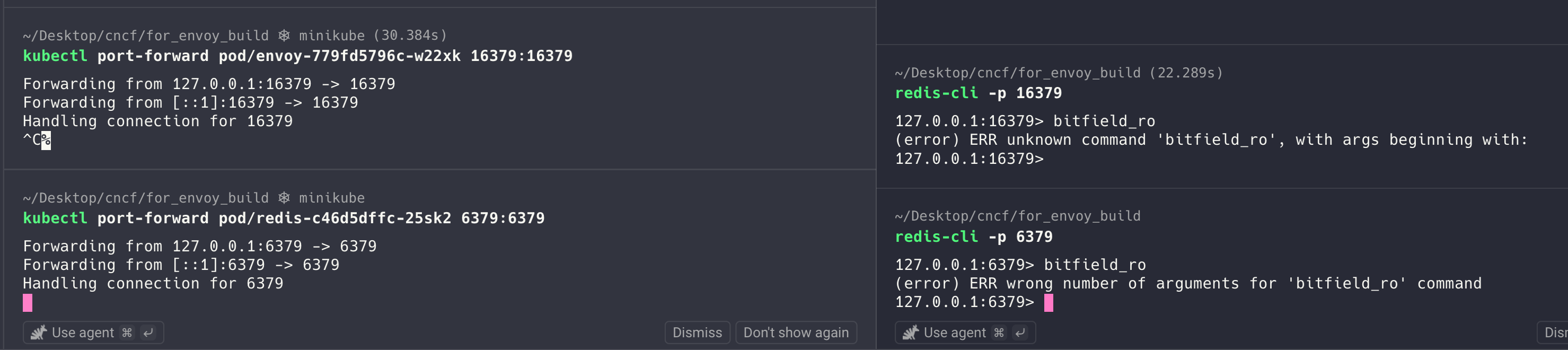
The two responses look similar at first glance, but they are fundamentally different:
- Port 6379 (direct Redis): “wrong number of arguments” — the command itself is implemented; we just failed to supply the right arguments. This is a normal, expected error.
- Port 16379 (through Envoy): “unknown command” — Envoy doesn’t even recognize the command. This means no handler is registered for
bitfield_roin the Redis proxy filter.
In other words, our custom-built Envoy’s Redis proxy filter is missing a handler for bitfield_ro. That missing handler is the starting point for the next post in this series.
What’s Next
If you have been following along, you can probably guess where this is heading. In the next post, we will actually implement the missing bitfield_ro handler in Envoy’s Redis proxy filter.
A quick aside: if you can read code, you can absolutely skip ahead on your own — point any modern LLM (ChatGPT, Claude, Grok, Gemini, etc.) at the source, generate a patch, rebuild, redeploy, and test. The basic loop is not complicated.
That said, I did not want to leave the series with a hand-wave. In the next post, we will walk through the implementation properly — adding a simple command to the Redis proxy while poking around the relevant parts of the Envoy codebase. The goal is not just a working patch, but understanding why the patch works.
See you in the next article.